















Name Badge Design Guide: How to Create Professional Badges
Quick answer: To design a professional name badge, focus on clarity, branding, and readability. Include essential information such as name, title, and company logo. Choose a legible font and appropriate size. NameBadge.com provides customizable templates to assist in creating professional-looking badges.
Tips from real designers who've made thousands of badges. Logo quality, font sizes, colors, and everything you need to know.
Quick Answer
A great name badge is readable, on-brand, and uses high-quality files. Use at least 18pt font for names. Send vector logo files (AI, EPS, PDF) or high-res PNGs. Choose high-contrast colors. Standard size is 1" x 3". Design online at NameBadge.com in about 5 minutes—or call us and we'll design while you're on the phone. Free design help included.
Real Designers Review Every Order
Unlike automated sites, our team in Florida checks your design before printing. We'll contact you if something looks off—pixelated logo, text too small, colors that won't print well.
In This Guide:
Design Tips from Real Designers
Simple rules from 20+ years of experience:
Keep Names Readable
Use at least 18pt font for names. Bold weights work better than thin. If customers can't read it from 6 feet away, it's too small.
High-Contrast Colors
Dark text on light backgrounds. Light text on dark backgrounds. Avoid light gray on white—it disappears.
Logo Quality Matters
Send vector files (AI, EPS, PDF) or high-res PNGs. Low-res JPEGs look pixelated. Don't have a good file? Ask—we can often recreate it.
Choose the Right Size
Standard is 1" x 3". Need credentials or titles? Go 1.5" x 3". Executive metal badges often look better at 1" x 3" for subtle elegance.
How Our Design Process Works
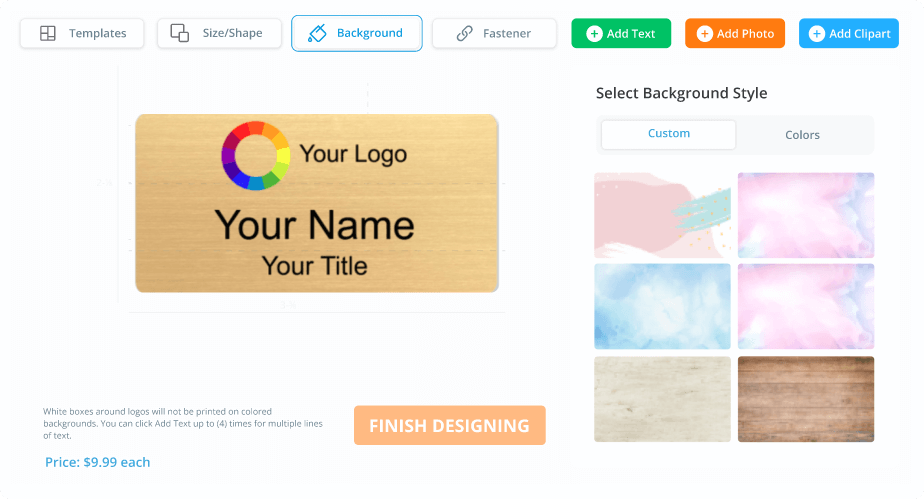
Use Our Online Designer
Upload your logo, add names, choose colors. Takes about 5 minutes.
We Review Your Design
Real designers check alignment, logo quality, text sizing. If something's off, we contact you.
You Approve, We Print
Happy with the proof? We start production. Standard production is typically 4–7 business days depending on order size and product type.
Saved for Easy Reorders
Your design stays on file forever. New hires? 30-second reorder.
Recommended Sizes & Fonts
| Use Case | Size | Name Font |
|---|---|---|
| Standard | 1" x 3" | 18-20pt |
| With Title/Credentials | 1.5" x 3" | 20-24pt |
| Retail/Customer Facing | 1.5" x 3" | 24pt+ |
| Executive Metal | 1" x 3" | 16-18pt |
Logo File Requirements
Vector (AI, EPS, PDF, SVG)
High-res PNG/JPG (300+ DPI)
Tiny web images, screenshots
💡 Don't Have a Good Logo File?
Send us what you have—we can often recreate logos from low-resolution files, photos of existing badges, business cards, or even website screenshots. This is free and included with your order. We'll contact you if we need anything else.
Us vs Automated Design Sites
| Feature | NameBadge.com | Automated Sites |
|---|---|---|
| Design Review | Real designer checks every order | Prints whatever you upload |
| Logo Help | We clean up or recreate logos free | Prints pixelated files as-is |
| Color Matching | Pantone-accurate brand colors | Colors vary batch to batch |
| Support | Call and talk to humans | Email-only support |
Name Badge Design FAQ
How do I design a custom name badge?
Use our online designer to select badge shape/size, upload your logo, choose colors, add names, and pick your fastener type. Takes about 5 minutes. Real designers review every order. Or call 800-243-9227 and we'll design while you're on the phone—free design help included.
What is the best size for a name badge?
The most popular size is 1" x 3" (one inch tall by three inches wide). This accommodates first name, last name, and small logo comfortably. If you need titles, credentials (RN, MBA), or department names, go with 1.5" x 3" for more space. Executive metal badges look elegant at 1" x 3".
What if I don't have a good logo file?
Send us what you have—we can often recreate logos from low-resolution files, photos of existing badges, business cards, or website screenshots. This is free with your order. Vector files (AI, EPS, PDF) are ideal, but we work with most formats.
Can you design the name badge for me?
Yes! Email us your logo, company name, and requirements and we'll create 2-3 design options. Or call 800-243-9227 and we'll design while you're on the phone, getting your feedback in real time. Design help is completely free with any order.
What font size should I use on name badges?
For names, use at least 18-24pt font to ensure readability from 6+ feet away. Bolder weights (semibold, bold) are easier to read. For titles/secondary text, 12-14pt works. Sans-serif fonts (Arial, Helvetica) are cleaner than decorative scripts.
How do I get exact brand colors on my badges?
Send us your Pantone codes, hex values (like #FF5733), or brand guidelines and we calibrate to match precisely. Don't know your colors? Send your logo file and we'll extract them for free. Every reorder matches previous batches exactly.
What file types do you accept for logos?
Best: Vector files (AI, EPS, PDF, SVG) scale perfectly. Good: High-resolution PNG or JPEG at 300+ DPI. PNG with transparent background sits cleanly on any color. We can often recreate simple logos from low-quality files at no charge.
Should I use first name only or full name?
Depends on your industry. Customer-facing roles (retail, restaurants) typically use first name only—friendlier and protects privacy. Corporate offices usually use full names. Healthcare requires full name plus credentials (RN, MD). Be consistent across your organization.
What background colors work best?
High contrast is key. Dark text on light backgrounds or light text on dark backgrounds. Avoid light gray on white—it disappears. White backgrounds with your brand color as an accent (border, stripe) is a safe choice. Avoid busy patterns.
Do you offer digital proofs before printing?
Yes! Every order gets reviewed by our design team. Request a proof at checkout and we'll email a digital mockup for approval. For standard orders, we only contact you if we spot issues. Proofs are free with unlimited revisions until you're satisfied.
Need Design Help?
Real designers in Florida who've done this 20+ years. Free help with every order.
Customer Reviews
Rated 4.9★ based on thousands of verified reviews across Google, Trustpilot, and ResellerRatings.